Making Complex Tech Simple

Helping engineering teams adapt faster to changing technology

Course: How LLMs Actually Work … no AI background required

16-lesson course · No AI background required

A 16-lesson technical curriculum for business leaders and technical professionals — no AI background required.

  • A curriculum about the mechanism, not the vocabulary.
  • Squarely between prompting tips and the maths.
  • 16lessons
  • 4parts
  • 0lines of code

What you’ll be able to trace

“The can can rust”
  1. Tokenizer
    Thecancanrust
    L1
  2. Embedding layerEach token becomes numbers — plus its position
    L2–3
  3. Transformer stackAttention + feed-forward, layer after layer
    L5–9
  4. Output layerOne next token, chosen — then again
    L10–11

Then: how every number in it was learned. L13–16

Why take this course

Stop guessing what the model is doing.

Each of these comes from understanding a specific mechanism — not from a list of tips.

01

See why the same word means different things

How a model that starts every word from one fixed representation ends up reading “can” as a container in one place and an ability in the next.

Lessons 3, 5–6
02

Know what you’re actually paying for

Why tokens, not words, set your bill and your limits — why output costs more than input, and why doubling a prompt more than doubles the work.

Lessons 1, 6, 11
03

Know what happens to what you type

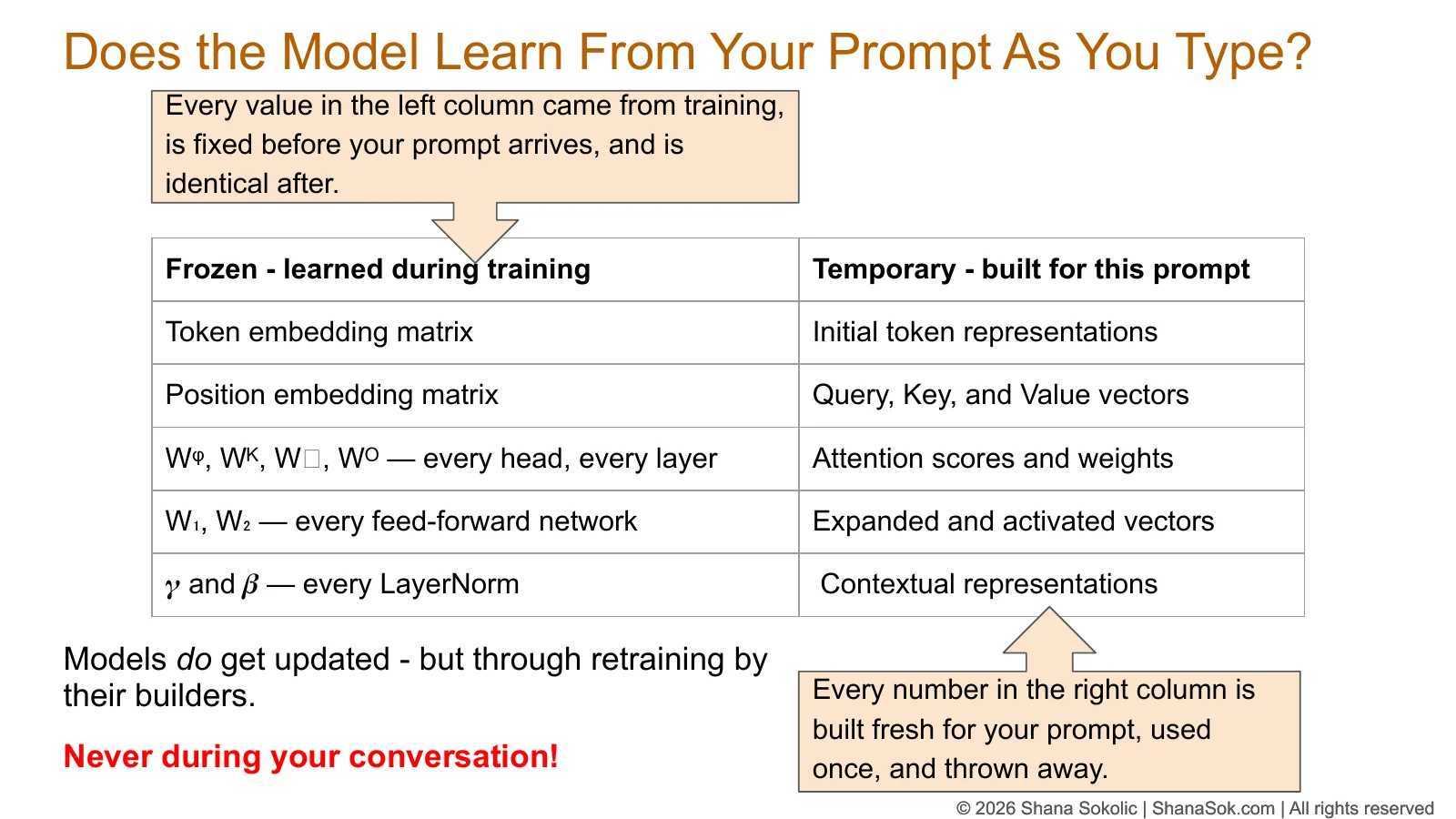
What is fixed when the model is trained, what is built fresh for your prompt and thrown away — and what your provider may still keep.

Lesson 8
04

Read vendor claims for what they are

What a parameter count, a “larger” model, or “diverse, high-quality training data” does — and doesn’t — tell you.

Lessons 4, 7, 13
05

Know what the model actually saw

What fits in the context window, what happens when your document doesn’t, and why the same prompt can give two different answers.

Lessons 10, 12
06

Understand where its behavior comes from

How training, fine-tuning and post-training shape what a model does — including why it refuses, and when you can change that.

Lessons 14–16

Questions you’ll finally be able to answer

Have you wondered about any of these?

Most lessons open with one of these questions — and close by answering it from the mechanism up.

  • Is this model biased — and does “trained on diverse, high-quality data” answer that?L13
  • Why does output cost several times more than input?L11
  • Is the model learning from what we type?L8
  • Did the model actually read page 190?L12
  • What am I really buying when I choose a larger model?L7
  • Do more parameters mean a better model?L4
  • Same prompt, two different answers — is that a bug?L10
  • Does the tokenizer matter when choosing a model?L1
  • How does the model tell my instructions from the document I pasted?L3
  • Can we just train our own model on our data?L14
  • Is there a version where our data never leaves our infrastructure?L15
  • The model refused a legitimate request. Who decided that — and can we change it?L16

Who it’s for

No AI background required. That is not the same as no depth.

You’ll work through the real operations — attention scores, normalization, how a token is chosen — with numbers small enough to check by hand. No code, and no maths prerequisite.

Other coursesPrompting tips & tool toursWhat to type into an AI tool
★ This courseHow LLMs Actually WorkHow the system actually works — and why it matters to your decisions
Other coursesML engineeringThe code and the mathematics

This course is for you if…

  • You make decisions about AI systems — choosing models, approving vendors, owning cost or risk.
  • You’re a technical professional who works with LLMs but isn’t an ML engineer.
  • You’re an engineer or developer who wants the architecture, not just the API.
  • You work in technical product, program or enablement roles and need to explain these systems to others.
  • You like to understand how something works before you trust it.

It isn’t for you if…

  • You want prompting tips or a tour of AI tools.
  • You want to write ML code or implement a model yourself.
  • You want mathematical derivations rather than worked examples.

What you’ll learn

16 lessons. One connected system.

You follow a prompt through the model, then step back to see how the model was built. Each lesson depends on the ones before it.

Part 1

From Text to Numbers

  1. 01
    TokenizationFreeHow text becomes tokens — and why that changes your costs.
  2. 02
    Token RepresentationsHow meaning becomes coordinates nobody designed.
  3. 03
    Embedding PositionHow the model knows word order — but not role.
  4. 04
    The Language of Machine LearningParameters, loss and gradients: the terms everything after builds on.

Part 2

Inside the Transformer

  1. 05
    The Transformer StackWhy a stack of identical layers, and what each one changes.
  2. 06
    The Attention MechanismHow context reshapes every token — and what it costs.
  3. 07
    The Feed-Forward NetworkWhere a bigger model’s extra parameters actually sit.
  4. 08
    Residual Addition & NormalizationWhat is frozen, and what is built fresh for your prompt.
  5. 09
    Modern Transformer ArchitectureWhy today’s models rearranged the classic design.

Part 3

Producing an Answer

  1. 10
    The Output LayerHow the next token is chosen, and why answers vary.
  2. 11
    The KV CacheHow generation works, and why output costs more.
  3. 12
    The Context WindowWhat the model can see — and what happens beyond it.

Part 4

Building and Changing the Model

  1. 13
    Preparing the Training CorpusWhere human judgement — and bias — enters the data.
  2. 14
    Training the LLMHow training changes the parameters, and what fine-tuning really costs.
  3. 15
    Open WeightsWhat is actually released — and when it keeps your data in-house.
  4. 16
    Post-Training an LLMHow a model is shaped into an assistant — and what that shaping costs.
LESSONS 1–12 → HOW A TRAINED MODEL ANSWERS YOU
LESSONS 13–16 → HOW IT WAS BUILT

Inference comes before training on purpose: by the time you reach training, you’ve already met every part of the model it changes.

Detailed syllabus

Why this order

The sixteen lessons follow a prompt through a model, then step back to explain how the model was made. Lessons 1–4 cover what the model receives. Lessons 5–9 open the transformer one component at a time. Lessons 10–12 complete inference: choosing a token, generating a response, and the limits of context. Lessons 13–16 cover construction: data, pretraining, open weights and post-training.

Inference comes before training on purpose. By Lesson 14 learners have already met every component whose parameters training adjusts, so training is introduced as a modification of the inference diagram they built over the previous ten lessons — not as a new system.

Part One

From Text to Numbers

  1. 01

    Tokenization Watch

    How raw text is split into the units a model actually reads, how a tokenizer’s vocabulary is built, and why tokenizer choice affects cost, context limits and non-English workloads. It comes first because every later stage operates on tokens, not words.

  2. 02

    Token Representations

    How each token becomes a point in a learned, high-dimensional space. Covers why nobody designs what the dimensions mean, and why “meaning” is a by-product of next-token prediction rather than its goal.

  3. 03

    Embedding Position

    What enters the model when a prompt arrives: one fixed, context-free lookup per token, plus position information supplied separately. Poses the question Lessons 5–10 answer: how does a fixed starting representation come to reflect context?

  4. 04

    The Language of Machine Learning

    A deliberate pause before the transformer: parameters, weights and biases, training versus inference, loss, gradients, learning rate, batches and epochs — so the architecture lessons can use them precisely. Tested against published AI news coverage.

Part Two

Inside the Transformer

  1. 05

    The Transformer Stack

    What the transformer is for, and why it is a stack of identical layers that each learn their own values. Covers what changes, and what does not, as representations pass through. Introduces the two components examined next.

  2. 06

    The Attention Mechanism

    How each token draws information from the tokens before it: queries, keys, values, multiple heads and causal masking, worked through at toy scale. Connects the mechanism to why longer prompts cost disproportionately more compute.

  3. 07

    The Feed-Forward Network

    The second component of each layer: what it does that attention does not, why it expands and then compresses each representation, and where a larger model’s additional parameters sit — the basis for matching model size to the task.

  4. 08

    Residual Addition & Normalization

    Completes the layer with the machinery that keeps a deep stack stable, then separates everything fixed by training from everything computed fresh for one prompt — the technical basis for answering whether a model learns from what users type.

  5. 09

    Modern Transformer Architecture

    Why the classic order of components proved unreliable to train at depth, and how pre-norm and RMSNorm changed it. Uses the gradient vocabulary from Lesson 4 to show architecture as a set of engineering trade-offs.

Part Three

Producing an Answer

  1. 10

    The Output Layer

    How the final representation becomes a choice of next token: logits, temperature, softmax, top-k, greedy decoding and sampling. Resolves the question opened in Lesson 3, and addresses what non-deterministic output means for audit trails.

  2. 11

    The KV Cache

    How an inference system generates text one token at a time, what it stores to avoid recomputation, and what that storage costs. Completes the end-to-end inference architecture and explains why input and output are priced so differently.

  3. 12

    The Context Window

    What the context contains, who decides what goes into it, and what happens when the input exceeds the limit. Distinguishes context from memory, and asks learners to establish what a model actually received rather than assume it.

Part Four

Building and Changing the Model

  1. 13

    Preparing the Training Corpus

    The shift from using a model to building one. Follows an example data pipeline from source selection to tokenization, identifying where human judgement — and therefore bias — enters at each stage.

  2. 14

    Training the LLM

    Pretraining in detail: how one sequence yields many prediction targets, how loss, backpropagation and the optimizer update parameters, and how the inference architecture is modified for training. Distinguishes pretraining from fine-tuning in cost and feasibility.

  3. 15

    Open Weights

    Why releasing source code would not give anyone a working model, what an open-weights release actually contains, and how open weights differs from open source. Connects the distinction to data-residency requirements.

  4. 16

    Post-Training an LLM

    How a pretrained model becomes a usable assistant: supervised fine-tuning, preference optimization (DPO, and RLHF with a reward model) and safety training — including over-refusal, catastrophic forgetting, and why safety training is not compliance.

Free preview

Start now: the introduction and Lesson 1 are free.

See exactly how the course teaches before the full course launches.

Introduction

What this course is, and what it isn’t

Chapters
  • 0:00Welcome, and the “magic brain” problem
  • 0:35What this course sets out to do
  • 0:52What this course is not
  • 1:14Technical depth, no code
  • 1:33Questions, and reading the news for yourself
  • 2:08Is this model biased?
  • 2:27Why output costs more than input
  • 2:46Is it learning from what we type?
  • 3:01Did it even read page 190?
  • 3:19What are you buying in a bigger model?
  • 3:41What is a parameter?
  • 4:05The 16 lessons
  • 4:26What you’ll walk away with
Transcript

Hello, my name is Shana.

Welcome to this course on how LLMs actually work. No AI background is required.

When I used to start thinking about LLMs in the beginning, I imagined this magic brain where we give a prompt or some kind of question and magic happens and the answer magically comes out. We hear buzzwords like neural networks. So then that makes me think of this like nodes
and lines connecting the nodes and I don’t know what the nodes are for, and I don’t know what the connecting lines are because it’s all rather magical. That’s how I used to think about it.

The aim of this course is to, bit by bit, step by step, break down that magic and replace it with actual technical knowledge about the mechanics that’s happening inside the LLM. There is still a bit of magic at the end, but not half as much as there is currently.

So what this lesson is and what this lesson is not. This is not a lesson that teaches you how to write a prompt. There is a lot of very basic lessons out there that are already do that. This is not a lesson that teaches you how to use someone else’s AI tool. And this is not a lesson that sits all the way on the other end of the spectrum that expects you to be a mathematical genius in order to understand what the LLM’s doing. It’s not.

This lesson sits squarely in the middle. Where we’re going to cover the technical details of an LLM and the architecture of the LLM, in-depth, but without using any code. So you’ll be able to understand this, even if you’ve got no engineering experience at all.

Throughout the lessons, we’re going to be posing a bunch of questions and answering them, right?
Questions that should be relevant to you. We will also show newspaper articles, excerpts from them, and you’ll see that you’re able to read them and understand them now.

You’ll be able to be in the room with other people, talking about LLMs, and be part of the conversation, as you make informed decisions that are relevant for your company, because you understand the architecture of the LLM, not just what you’ve heard people parrot back at you.

These are some examples of some of the questions that we’ll be going through throughout this course. Here’s one.

Your risk committee asked the vendor “is this model biased?” and the vendor replies that it was trained on diverse, high quality, publicly available data. Well, does that answer the question?
Does the data being diverse, and high quality and publicly available, stop it from being biased? Hmm… let’s see.

Another question. Your API bill has two line items for the same model. You’ve got your input tokens with one price, and then your output tokens, with a different price that’s usually much higher. Why does it cost more for the API to produce output, than to read the input?

The team has been pasting customer records into an AI tool. And eventually, someone asks, “so do you think this model is actually learning from what we type into the LLM?” That’s a very relevant question. A lot of people have this question, and we’re going to clear this up once and for all.

Your team pastes a 200 page policy into the tool, and asks it a question about a specific page, say page 190, and they get a very confident answer from the LLM. How do you know, that the model even looked at your page? How do you know?

Next question, your vendor offers the same model in three different sizes at three price points, and you’re told that the big one is really, really much more capable than the others. Well, what are you actually buying more of? Do you need it? The only way to answer that, is to understand the architecture of the LLM, understand why a bigger one makes a difference.

There’s many AI announcements, and you see them in newspapers, 10 trillion parameters, 70 billion parameters, or three billion parameters, small enough to run on your phone, and your vendor will quote one, and your board’s going to ask you, what does it mean? Well, what’s a parameter, and what does a bigger number, or more of them mean? Does that make it a better model? And more specifically does it make it a better model for your use case?

So throughout this course, we’re going to be answering these questions, and more. We’ve got 16 lessons that we’ll be going through, starting all the way from the very very beginning of what’s a token, and finishing off at how you’re going to train or fine tune an LLM to solve your business needs.

I’m really excited to walk through this journey with you. It’s going to get complex, but we’re going to take all those complexities, split them up, bit by bit by bit, until we’ve got a really deep mental model of what’s happening in the LLM. You’ll be able to make decisions for your team, based on knowledge, real, deep understanding of what an LLM is doing. Not just parroting back information that you hear from other people.

With that, see you in lesson number one.

Lesson 1

Tokenization

Two AI models can read the exact same sentence and charge you completely different amounts for it. Find out why — and how to measure it before you pick a model.

What you’ll learn
  • What a token actually is, and why models don’t use whole words
  • How Byte Pair Encoding builds a vocabulary, step by step
  • Why merge rules are stored in order, and why that order matters
  • Why the tokenizer and the model are permanently paired
  • Why non-English text, code and ID numbers cost you more
  • How to measure tokenization against your own business data
Transcript

Chapter 1: Tokenization

Segmenting raw text to build an LLM’s vocabulary. This is a lightly edited transcript of Chapter 1 of “How LLMs Actually Work.” No AI background required.

The question we’re trying to answer

Hi, my name is Shana, and welcome to Chapter 1 of my course on how LLMs actually work. This chapter is about tokenization.

Here’s the question we’re going to answer: does the tokenizer matter when choosing an LLM for your business? Two models can receive exactly the same text and turn it into different numbers of tokens. When does that difference actually matter?

To get there, we first have to know what a token is, why we don’t use full words, and why we use subwords instead. Throughout this course I’ll be presenting definition boxes, and at the end there will be a glossary you can download from my website.

What is a language model?

The whole course depends on us knowing what a language model is. It’s an AI system that processes and predicts human speech or text. What it’s doing is learning statistical patterns and relationships in text fragments.

We often want to think it understands, that it’s thinking. I don’t know if it’s doing any of that. But what we do know is that what it’s doing is math. It’s learning statistical patterns and relationships between text fragments, and that allows it to complete sentences, translate languages and recognize context.

A large language model is the same thing, but trained at massive, massive scale — billions of parameters and vast amounts of text. Claude is an example of an LLM. We haven’t covered the term “parameters” yet, but that’s coming later in the course.

Three types of LLM architecture

There are three types of LLM architecture: decoder-only, encoder-only, and encoder-decoder. This course only focuses on decoder-only LLMs — the ones that predict the next token, like ChatGPT, Claude and Llama.

Vocabulary

Let’s start at the beginning. Whenever anyone learns a language, they have to build up their vocabulary. LLMs are no different. In this case, the vocabulary we give the LLM to learn is made up of tokens, which are pieces of text — not necessarily full words.

The tokenizer’s job is to take text and turn it into tokens. It does that twice. It tokenizes the text when the LLM is being trained on its initial training material, and it tokenizes any prompt we give it afterwards so the LLM can process it.

For the LLM to understand any prompt we write, that prompt has to be given in the language the LLM understands, using the vocabulary it was trained on. That’s why the tokenizer and the LLM go hand in hand. Whatever was used to create the initial vocabulary the LLM was trained on is what has to be used whenever we give that LLM something to process.

Phase 1: Building the tokenizer

The job of the tokenizer is to decide what chunks of text the model should treat as individual pieces.

It starts with a large text corpus. In my example I’ve shown only four lines — obviously that’s not what it would really be given. It would be given huge amounts of text. And it has to decide how to break those lines into small pieces that the LLM can learn. Those pieces are called tokens. At this stage, all we have is characters and words.

The simple approach, and why it fails

The simplest possible tokenizer would say: every word is a token. Just take all that text and split it on spaces. Now you have a list of tokens — the, cat, sat, on, the, mat — and that’s your vocabulary.

But this is very problematic. If the model is given a word it has never seen before, such as “computes,” it would have no way to represent it.

So then we’d say: fine, we’ll give it more words. We’ll have cat, and cats, and catlike, and catwalk. We’d need so many words to make sure the model is never blindsided, never given a token it doesn’t understand. But very quickly you find the number of words you’d need is just colossal.

That’s why this approach is impractical. We don’t have unlimited space for every possible token. A better approach is to store reusable pieces: cat, and then s, and then like, and walk. From there the tokenizer can put them together and represent words it has never seen.

Subword merge rules: Byte Pair Encoding

From this idea we get the concept of subword merge rules — how a vocabulary is built up iteratively, via Byte Pair Encoding.

Imagine the corpus of text we’re giving our tokenizer contains these words: computer three times, computing twice, faster four times, and similarly master, lower and newer.

Round 1. The tokenizer looks for adjacent pairs. It sees “e” and “r” next to each other three times in computer, because computer appears three times. Then it appears in faster four times. It adds up every place that pair occurs across the whole corpus, and the total is 19.

Then it looks at other pairs. How many times do “t” and “e” appear next to each other? That’s only 10 times across the whole corpus. It’s not in computing, but it is in faster. It’s not in lower. And it keeps adding them up until it has a tally — and “e” and “r” win.

So the first merge rule becomes: merge the adjacent pair “e” and “r” to make “er.” That becomes a token, added to our list, and it can be used in future rounds.

Round 2. Now it asks how many times “t” appears adjacent to our new token “er.” Three times in computer, four in faster, three in master — 10 times. When it does that for all the other adjacent pairs, “t” next to “er” wins. So our second merge rule creates “ter.”

Round 3. It continues. It looks at “w” next to “er.” It looks at “s” next to the token “ter” that we made in round 2. In this case the winner is “wer,” and that becomes the third merge rule.

Notice it doesn’t matter where in the word the pair occurs. In this case “ter” is at the end. Beginning, middle or end — it makes no difference. The tokenizer is simply looking for an efficient way to merge adjacent pairs, choosing whichever pair occurs most frequently. And it keeps track of the merge rules it performed to create each token, in each round.

How the vocabulary gets built

Let’s lay out what’s happening.

  • It starts with single characters and gradually creates larger, reusable pieces.
  • It counts every adjacent pair in the text corpus.
  • The most frequent pair is merged everywhere at once, and the new token is added to the vocabulary.
  • The winning pair can sit anywhere in a word — beginning, middle or end.
  • Each new token is then eligible to take part in future merges.
  • It does this thousands and thousands of times.

And this is the part I want to say twice, because it matters: the number of merges is limited by the target vocabulary size.

There is not an unlimited number of tokens we allow it to find. We don’t let it keep going until it has found every variation and combination. When the engineers design their LLM — and the tokenizer that will go hand in hand with it — they set a limit on how many tokens that LLM will be trained on, and therefore how many tokens the tokenizer will find. It cannot go on forever.

So the process is finite. The tokenizer does not learn every possible intermediate form of every word. At the end of it, the result is a vocabulary of reusable fragments, which we call tokens — and the merge rules, in the order they were created.

A word the tokenizer has never seen

Before the nuances, remember that the tokenizer is used in two places: to find the initial vocabulary the LLM is trained on, and again every time we use that finished LLM, to turn our prompt into the tokens it understands.

Now imagine the LLM is prompted with a word it has never seen before. The tokenizer will split that word into tokens it does have. For “computes,” it might have “comp” and “ut” and “e” and “s.” It has never seen the whole word, but it has these four tokens.

So there is no requirement that every word becomes a single token — that would make the vocabulary far too big. Some words end up as one token, others as two, three or more. The tokenizer’s goal isn’t to capture words. It’s to build an efficient vocabulary of reusable text fragments.

Token IDs

Once the tokenizer has finished creating its vocabulary, it assigns a unique ID number to each token. In our case, “comp” might be 0, “ut” might be 1, “e” might be 2, and so on.

The ID itself has no meaning. It’s just an index, like a row number in a database. There’s no special significance to it — it exists purely to uniquely identify each token.

Storing the merge rules

In our example, the tokenizer started with small pieces — the word computer, each letter separate. Then it learned that “e” and “r” are adjacent and can merge into “er.” Then that “t” is adjacent to “er,” giving “ter.” And so on.

The tokenizer stores these merge rules. Why? Here’s the thing I want you to understand: every future prompt must be tokenized using exactly the same rules that were learned from the initial text corpus.

It stores the rules in the order it learned them, because that order sets the priority of each rule. Think back a few steps — the first merge rule came from the adjacent pair that appeared most frequently in the corpus. That priority matters. Every prompt you give your LLM goes through the same tokenizing process, using the same established merge rules, created when the tokenizer was first built.

The tokenizer is complete

At this point the tokenizer is finished. The vocabulary has been determined, the merge rules are established, and the token IDs have been assigned. That’s phase one.

And here’s the thing to sit with: at this stage the LLM has not learned anything yet. All we have is a tokenizer, with a vocabulary, with merge rules, and with token IDs. The LLM has not been trained.

So, again — the LLM is not trained on words. It’s trained on the token sequence produced by this particular tokenizer, the one that goes hand in hand with it. How the LLM actually gets trained is something we’ll cover in future chapters.

Tokens in, detokenization out

We’re back to the magic brain picture. It still seems magical, but it’s slightly less magical than it was, because we know something we didn’t know before. It isn’t just a question going into the LLM and an answer coming out.

We know the prompt we type is tokenized, and that the tokens are what get sent in. And we can extrapolate the other side: if the LLM is processing tokens, then what comes out must be tokens too — so there must be a detokenization process that turns them back into text we can read.

Tokenization going in. Processing in the middle. Detokenization coming out. The brain is slightly less magical than it was.

How a prompt gets tokenized

First the text is split on whitespace and punctuation into small chunks. By the way, the spaces don’t get thrown away — each space gets attached to the front of the word that follows it. We’ll see that in the hands-on demo shortly.

Inside each chunk, the tokenizer applies its stored merge rules. Those rules are an ordered list: rule one was learned first, so it has the highest priority and is applied first.

In each round, the tokenizer looks at every adjacent pair in the chunk and merges the highest-priority one — wherever it sits, beginning, middle or end. It repeats until no adjacent pairs appear in the merge rules. When nothing left in the chunk matches a rule, it stops merging and goes with the tokens it has found.

Worked example: a word the tokenizer knows

Let’s take a word the tokenizer knows — computer. It’s in the original vocabulary, and the LLM was trained on it.

The tokenizer breaks the word into individual characters and goes through the merge rules in order:

  • Rule 1 — “e” and “r” are next to each other, so they merge into “er.”
  • Rule 2 — “t” can merge with “er,” giving “ter.”
  • Rules 3, 4 and 5 — “wer,” “as” and “aster” are not applicable here, so they’re skipped.
  • Rule 6 — “c” and “o” merge into “co.”
  • Rule 7 — “m” and “p” merge into “mp.”
  • Rule 8 — “co” and “mp” merge into “comp.”
  • Rules 9 and 10 — and finally you have “computer.”

The result is a single token.

Notice the merges did not run left to right. We started at the end, went to the beginning with “co,” then did “m” and “p” in the middle. It wasn’t going in the order the letters were typed. The word was assembled from the end, then the front, then the middle — always taking whichever pair had the highest priority.

And when you look at the rule numbers going down the list, they always climb. You’ll never see them jump around, because the highest-priority rule is always applied first.

Worked example: a word it has never seen

Now a word the tokenizer has never seen: computes. Same merge rules.

  • Rule 6 — “c” and “o” merge into “co.”
  • Rule 7 — “m” and “p” merge into “mp.”
  • Rule 8 — “co” and “mp” merge into “comp.”
  • Rule 11 — “u” and “t” merge into “ut.”

And then it stops. There are no more applicable rules. Rule 12 makes “in” and rule 13 makes “ing,” but neither applies to “computes.”

The result is four tokens: comp / ut / e / s.

The tokenizer has never seen the word “computes.” But it has seen these individual tokens, and that’s what gets given to the LLM. A word the tokenizer never saw is built from pieces it already has. Some rules are never used, simply because the pair isn’t present in that word.

Two different jobs

So the tokenizer does two quite different things.

When it’s created, it builds an efficient vocabulary through statistical rule-building. Its goal at that point is to discover an efficient vocabulary and the merge rules, keeping track of both.

At inference — when the LLM has been trained and is being used — we use that same tokenizer to tokenize our prompt. It reapplies those same merge rules in the order they were learned. Its goal now is to segment new text exactly as the training corpus was segmented.

The tokenizer is entirely bound by its original vocabulary list.

Tokenizer algorithms in real models

Everything above describes the tokenizer used by GPT-2, released in 2019. It’s the most widely taught example because it’s the clearest to follow.

Modern models use a variety of tokenizer algorithms. GPT-2, GPT-4 and Llama all use some form of Byte Pair Encoding — the one we’ve just been through. Others use different approaches: T5 uses SentencePiece Unigram, BERT uses WordPiece. Claude and Gemini have not publicly documented what their tokenizer algorithms are.

There are open-source libraries for all of this. If you want to try Byte Pair Encoding, you can use tiktoken. There’s also sentencepiece, and transformers, which will run any of them. So: different models, different algorithms — and most of them are public. If you’re handy with code, this is something you can actually run yourself.

The tokenizer isn’t the hard part

The algorithms behind tokenizers are not proprietary. Anyone can train a tokenizer using open-source libraries.

The challenge in building an LLM isn’t creating the tokenizer. The real challenge is training the neural network on huge, huge amounts of tokenized text — and we haven’t even begun to talk about that yet.

Why should a business care how text becomes tokens?

Because tokens are the unit you are billed in, limited by, and throttled by. Not words.

  • Price is measured in dollars per million tokens.
  • The context window — the number of tokens that can be processed per request — decides how much of your document fits in a single call.
  • Latency is time per token, not per word. That’s how fast your user gets an answer.
  • Rate limits are tokens per minute. That’s how many users you can serve at once.

We care about tokens because that’s what we’re working with. The LLM is working in tokens, not words.

Not all text costs the same

Merge rules are learned from the training corpus, and that corpus is mostly English. So the tokenizer builds long, efficient tokens for English — it keeps merging adjacent pairs until the tokens have quite a lot of characters in them.

But non-ASCII characters start out taking more bytes, and more bytes cost more. Remember what BPE stands for: Byte Pair Encoding. It works on bytes, not letters.

So here’s a quick primer on how characters are represented in computing.

  • 0–127 — one byte. This is ASCII. The letter “a” is 97, which sits in the middle of that range, so it’s one byte.
  • 128–2,047 — two bytes. Hebrew, Arabic, Greek, Cyrillic, and accented European characters. The Hebrew letter mem is 1,502, so it takes two bytes in UTF-8.
  • 2,048–65,535 — three bytes. Japanese, Chinese, Thai, Hindi.
  • 65,536 and above — four bytes. Emoji.

Because our tokenizer is trained mostly on English text, it’s going to be most efficient with ASCII characters, which only use one byte. Whether it compresses the two-, three- and four-byte characters back down depends on how much of that language it was trained on. It might. You’ll have to test it.

So the tokenization process has more financial significance to you if you’re dealing with characters that aren’t ASCII. It’s going to start costing you more, and that might be a factor in your business decisions.

Why does the same prompt cost more in one model than another?

Simply because different models use different tokenizers — and different tokenizers have different vocabularies, different rules, and different ways of dividing the same text. So the same prompt does not produce the same token sequence. The LLM receives whatever its own tokenizer produced.

What you can’t do is say, “I love this LLM, but I prefer that tokenizer, so let me use them together.” You can’t mix and match. The tokenizer and the LLM go hand in hand. Part of the choice you make as a business is whether a given tokenizer-and-LLM combination works well for the kind of text you’ll be feeding it.

Does the tokenizer matter when choosing an LLM?

Potentially, yes. If two tokenizers split the same business workload differently, one may need more tokens to represent the same information.

That matters if you’re processing large documents, large volumes of documents, very domain-specific terminology, or high-volume AI workloads. The tokenizer is therefore one factor to consider when evaluating an LLM.

Does fewer tokens mean a better model?

No. Token efficiency is only one factor. You also have to consider:

  • Model capability — does it perform the required task well?
  • Token efficiency — how many tokens does it need to represent your workload?
  • Workload volume — how much text will the business actually process?
  • Business economics — what does the difference mean for cost and capacity?

Is the difference in tokenization significant enough to matter for your workload? That’s going to be very specific to your domain.

How to evaluate it

You can evaluate this. It isn’t a hidden secret, and it isn’t where the magic brain comes in. Here’s how:

  1. Take a representative sample of the text your business expects to process.
  2. Tokenize the same sample with each model’s tokenizer.
  3. Compare the token counts.
  4. Combine those counts with your expected workload, volume and pricing.

So you don’t have to guess. You measure before you select your model. And what that means is significant: tokenization is now a measurable business characteristic. It’s something you can make a reasoned decision about. You can go to your board having done the homework.

Hands-on exercise

There’s a great tool for this, and I’d encourage you to go and try it yourself:

https://gptforwork.com/tools/tokenizer

Find a piece of text whose content you are comfortable pasting into a third-party tool — and I’ll say that again, text you are comfortable pasting into a third-party tool. Paste it in, and it will show you the token count for each model. Don’t just look at the count; look at how the text was divided.

What the demo showed

I started with a basic sentence: “The fox sat on the rock.” As you’d expect, each word is its own token — and you can see that the space before each word is counted as part of that token. Six words, six tokens. Grok gave six as well. Claude gave thirteen for the same sentence.

Then I tried something more interesting — a passage without too many strange words, but containing things like “COVID-19,” which became three tokens. The name “Bryn Mawr” was split: it found “Bryn,” but had to break “Mawr” into two tokens, with the “r” separated off. The year 1918 was split too: “191” came out as one token and the “8” as another.

Across that passage the models were fairly close. 111 words came to 130 tokens in one, slightly more in another, and about twenty more again for Claude. Not a dramatic difference.

Then the interesting one. I had a complex medical text — words I couldn’t begin to pronounce. 188 words became 438 tokens in one model, and only 341 in another. More than double the number of tokens to words in the first case, and a very significant gap between the two models.

If you’re going to be processing medical text, that’s a cost you’ll be paying, every single request.

So play around with the tool. Paste in different kinds of text — text you’re comfortable pasting in — and see how it performs. Come away with the knowledge that different LLMs use different tokenizers, that each one will divide your text differently, and that your choice should take into account the kind of text you’ll actually be giving it.

Summary

  • An LLM never sees words. It sees tokens.
  • A tokenizer builds a vocabulary of reusable text fragments from a training corpus.
  • Byte Pair Encoding builds that vocabulary by repeatedly merging the most frequently occurring adjacent pair.
  • Every token gets an ID. The ID is just a unique identifier and carries no special meaning.
  • The merge rules are stored in the order they were established, so every future prompt is split exactly the same way.
  • The tokenizer and the model are permanently paired. They go hand in hand.
  • Not all text costs the same. Non-English text, code and ID numbers need more tokens than plain English.
  • Different tokenizers divide the same text differently — so you can measure it before you choose a model.

A glossary of every term from this chapter is available to download. I’ll see you in the next chapter.

Inside the course

What the teaching actually looks like.

  • One running example“The can can rust” is carried through the whole architecture, lesson by lesson.
  • Real calculations, small numbersThe actual operations, with numbers small enough to check by hand.
  • Misconceptions, namedCommon wrong ideas are stated plainly — then corrected.
  • Every mechanism, a decisionLessons end with what it means for cost, data, risk or vendor choice.
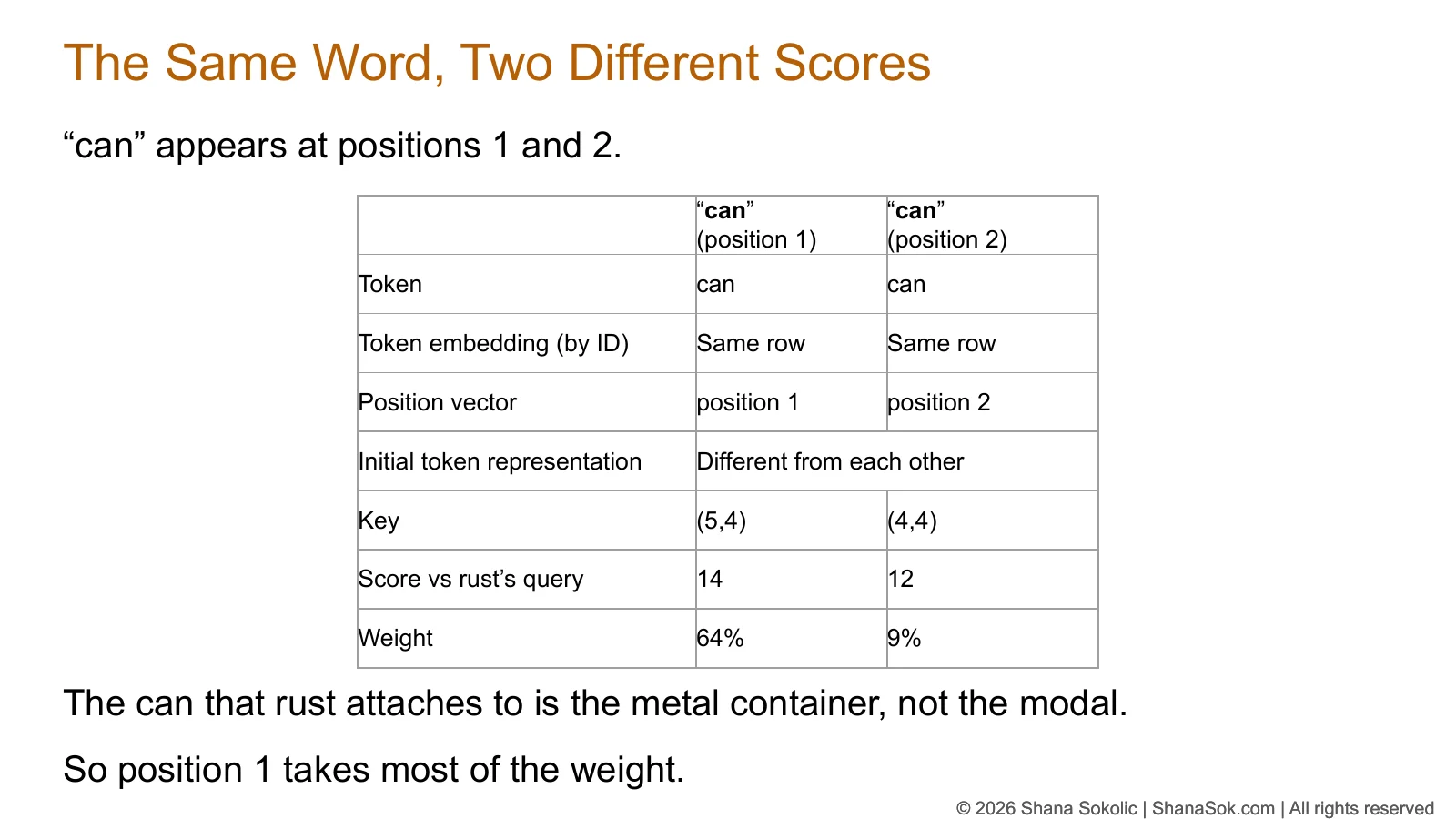
Slide titled The Same Word, Two Different Scores: the two occurrences of can in The can can rust share an embedding row but receive different keys, attention scores and weights.
The same word, two different scoresLesson 6The running example, worked through attention.
Slide titled Does the Model Learn From Your Prompt As You Type?, with a column of parameters frozen during training and a column of values built temporarily for each prompt.
Frozen versus temporaryLesson 8Is it learning from what you type? The answer comes straight from the architecture.
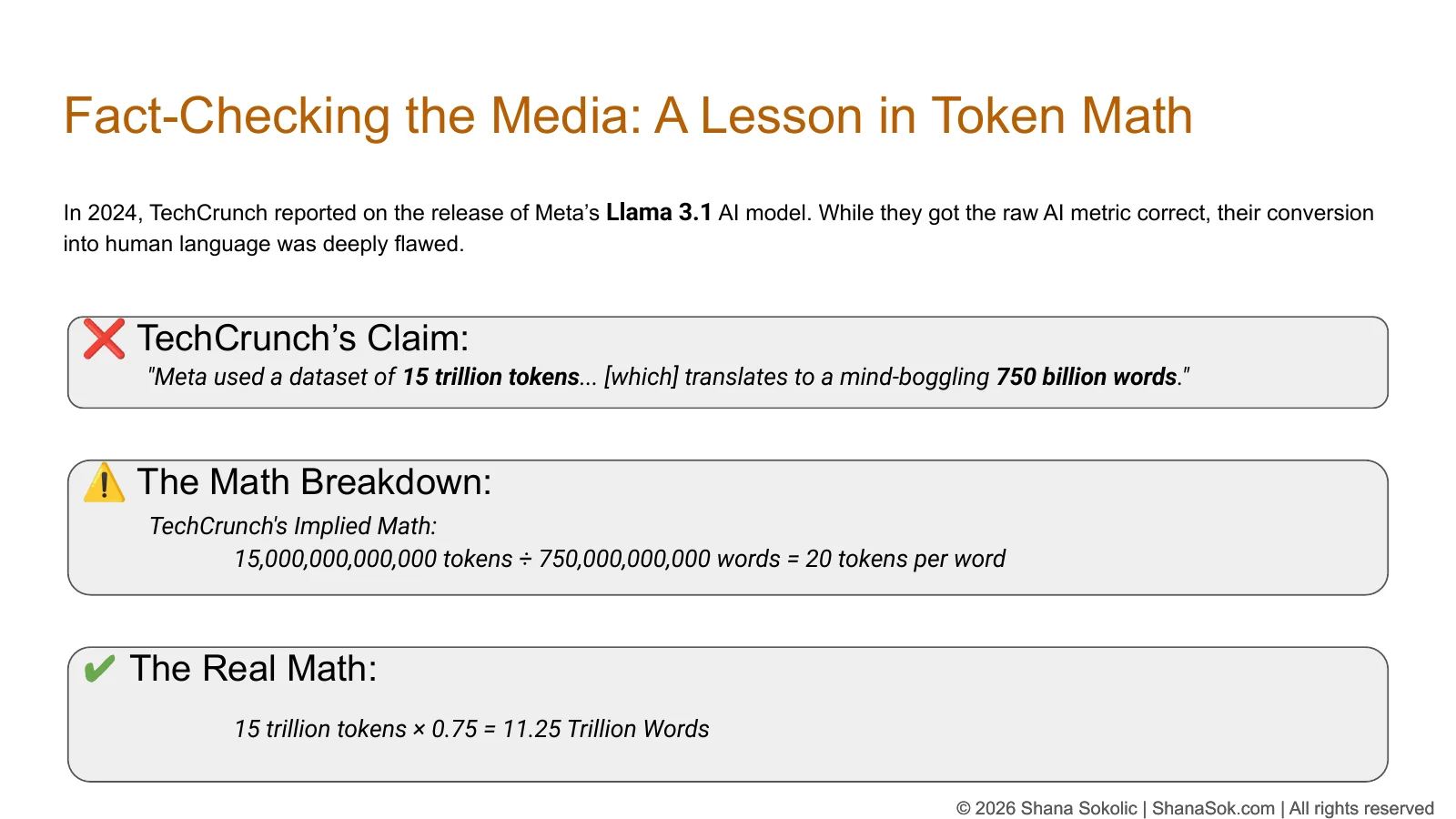
Slide titled Fact-Checking the Media: TechCrunch's claim that 15 trillion tokens translates to 750 billion words, the implied 20 tokens per word, and the corrected figure of 11.25 trillion words.
Fact-checking the mediaLesson 4Using what you’ve learned to catch a published error.
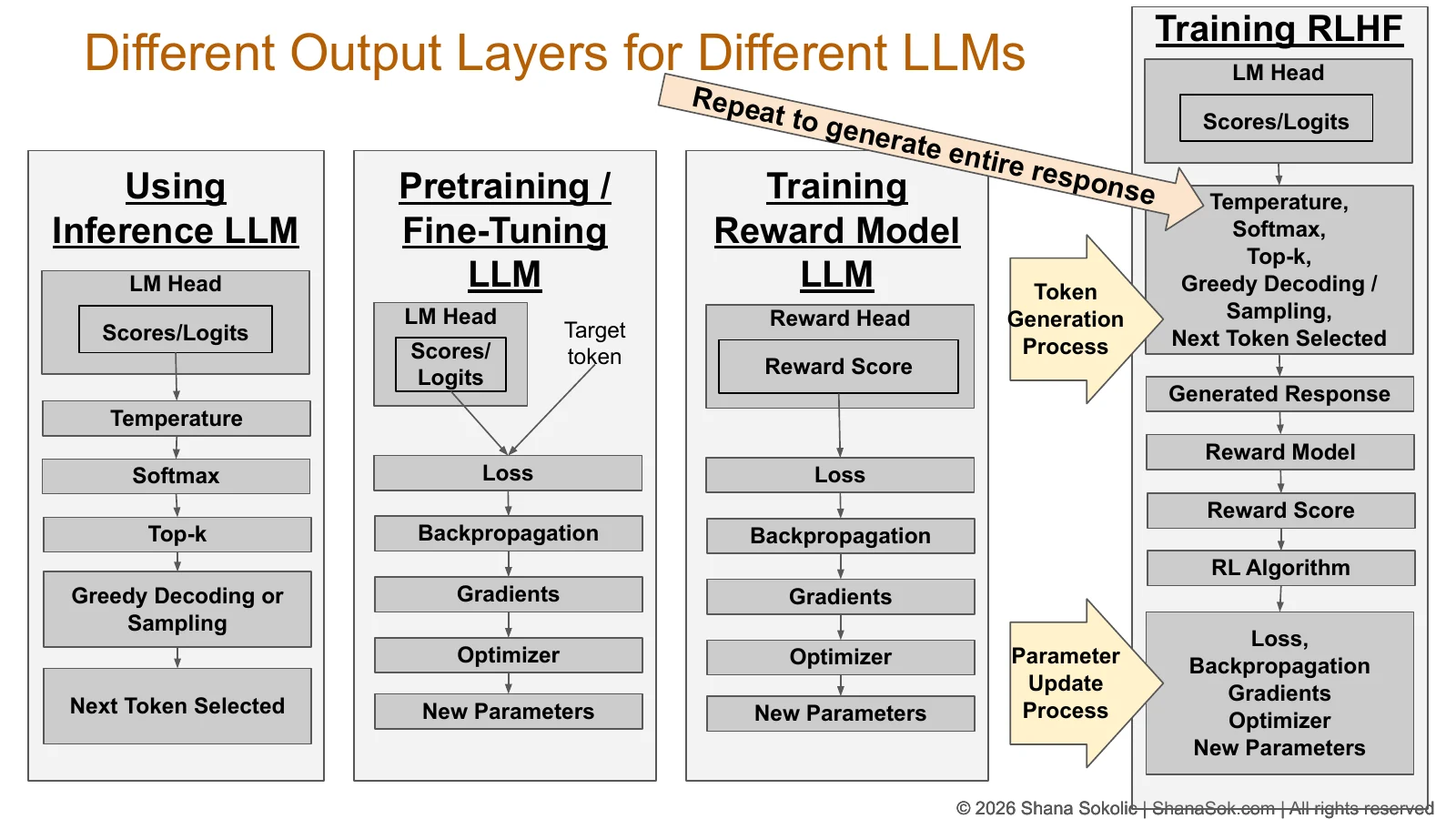
Slide titled Different Output Layers for Different LLMs, comparing the same model configured for inference, pretraining or fine-tuning, reward-model training and RLHF.
One model, four configurationsLesson 16Inference, training, reward model and RLHF, side by side.

“Bias didn’t survive the pipeline. It is the pipeline.”

LESSON 13 · PREPARING THE TRAINING CORPUS

Hands-on exercises

You won’t just watch. You’ll investigate.

Exercises send you to real tools and real documents, and ask you to reach a conclusion you can defend.

Lesson 1

Measure your own text

Run the same text through the tokenizers of four model families and compare how each one splits it — before you choose a model.

GPTClaudeGeminiGrok
Lesson 8

Investigate a vendor

Legal asks whether an AI assistant can be trusted with confidential customer data. Check a real vendor’s documentation against their questions.

TrainingRetentionAccess
Lesson 12

Did the AI read it all?

Give a real AI tool a very long document, then work out what you can — and can’t — conclude from what happens.

“But you cannot establish why.”

Get the full course

Ready to deliver — in person or over Zoom.

Bring How LLMs Actually Work to your organization. I’m ready to deliver the complete 16-lesson course in person or remotely, tailored to your audience.

  1. ✓ WrittenAll 16 lessons
  2. ✓ PublishedIntroduction and Lesson 1
  3. ◐ RecordingLessons 2–16

Created and taught by Shana Sokolic. Read about my approach

© 2026 Shana Sokolic · ShanaSok.com · All rights reserved. Slides shown are excerpts; the full course materials are not published.